

A backyard R10 setup starts with two distances: launch monitor to ball and ball to the net or screen that stops the shot. They establish the tracking layout. The golfer, containment, device connections and storage still need their own checks.
For outdoor use with a net or impact screen, Garmin specifies 6–8 feet behind the ball and at least 8 feet from the ball to the net or screen. Its outdoor checklist also calls for an unobstructed area and a hitting space or mat at least 2 feet by 2 feet. Those are product requirements, not approval of your finished setup. Garmin’s indoor and outdoor placement guidance.
Use the four checks below before buying the missing equipment. This is a source-backed planning guide; Flag & Fringe has not field-tested the illustrated installation.
1. Measure the tracking layout
Mark three positions: the R10, the ball and the surface that stops the shot. Measure each segment separately.
A net’s opening can sit closer to you than its rear target. In a verified forum answer, Garmin-Cody clarifies that the ball-flight measurement ends at the stopping target. A nearer part of the net matters if it can stop the shot there. Garmin’s target-distance clarification.
Worked example: what 15 feet tells you
7 ft behind the ball + 8 ft to the stopping target = 15 ft of tracking span.
These are hypothetical planning inputs. The sum excludes the device footprint, space behind the target and the rest of the installation.
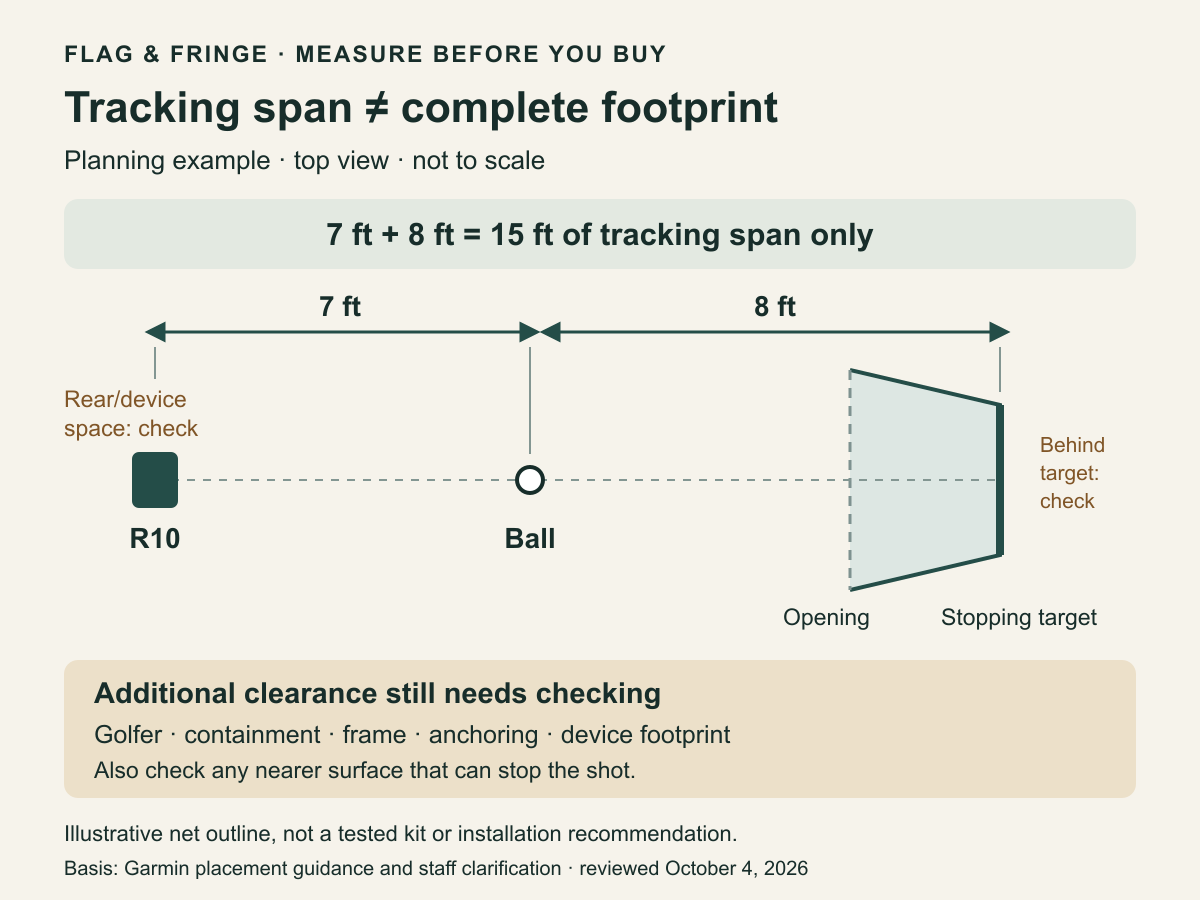
Do not turn that arithmetic into a universal space requirement. Garmin gives separate indoor room guidance. If your practice area is a garage or enclosed room, use the R10 indoor setup guide as well.
2. Check the golfer, mat and containment
Measure usable space around the actual hitting position. Include low branches or beams, fences, net framing, equipment and access routes. Account for the finished mat or platform when checking overhead clearance. Every intended golfer needs their own unobstructed swing space.
For the exact net, screen or enclosure, record:
- Outside dimensions and the usable opening.
- Required space behind the stopping surface.
- Installation, anchoring and protection requirements.
- Permitted environment and storage instructions.
For indoor use, Garmin’s manual calls for swing clearance, space behind the catch surface, coverage for high and errant shots, and padding around enclosure frames. The same manual also specifies the R10’s height relative to a raised mat: the device’s bottom edge should sit above the mat. Use the supplied tripod and follow the alignment instructions. R10 owner’s manual, “Preparing for a Shot”.
The minimum hitting area is not a mat recommendation for every stance. Mark where both the ball and your feet will be, including any left- and right-handed users. Our room-measurement guide explains how to record usable dimensions and obstructions.
Have your measurements and existing gear ready? Start your equipment plan in the Builder. Keep backyard clearance and installation questions on this worksheet; the Builder does not certify the site.
3. Confirm the app and display connection
Choose the software experience before buying a PC, adapter or projector. Write down the exact app, host device, connection route, display and any paid entitlement.
Connection methods vary. Awesome Golf’s current R10 instructions include direct Bluetooth to a supported computer, with initial Garmin Golf setup still required. Follow the instructions for your exact platform rather than assuming every route needs—or eliminates—a phone bridge. Awesome Golf’s R10 connection guide.
Check these questions before ordering:
- Does the chosen app support your device and operating system?
- Does the display route support video output from that device?
- What needs internet access, charging or external power?
- Which features require a paid plan, and what renews?
A projector is an optional display direction, with its own throw distance, mounting and visibility checks. Outdoor light control matters; a bright-looking product image is not evidence of visibility in your yard. BenQ’s outdoor projection guidance.
4. Plan the whole kit’s trip back to storage
List everything that leaves storage: monitor, mat, net, protection, device, stands, cables, chargers and display equipment. Record the largest packed piece, the heaviest item, available help and where each part goes.
When you have the kit, time the complete routine: retrieve, assemble, align, connect and reach the first valid shot. Then time shutdown and packing. Record drying work separately when needed. Product weight alone cannot tell you how quickly your complete setup will be ready.
“Portable” is not permission to leave equipment outside. Check each component’s weather and storage instructions. A cover over the setup does not establish suitability for everything underneath it.
Copy this before-you-buy worksheet
Tracking: R10 to ball ___; ball to stopping surface ___; measured or estimated ___; any nearer stopping surface ___.
Clearance: usable width/depth ___; lowest obstruction above the hitting surface ___; exact net/screen model ___; required rear space ___; unresolved swing/containment checks ___.
Connection: app ___; host device/OS ___; display route ___; internet/power ___; recurring plan and renewal cost ___.
Pack-away: largest packed piece ___; heaviest item ___; help needed ___; storage location ___; drying/storage instructions ___.
Keep unknowns visible. A blank clearance or connection field is a question to resolve, not a reason to assume a match.
Turn the worksheet into a useful shopping list
Start with what you already own. For each missing category, separate needed now, optional upgrade and not verified yet:
- Launch monitor: retain an owned R10 if it remains suitable for the plan.
- Net, enclosure or impact screen: check the exact variant and its containment requirements.
- Hitting mat: include usable stance area and the raised-surface relationship.
- Projector or display: choose only after establishing the display route.
- Software and PC/device: account for required hardware, licenses and renewals together.
- Accessories, mounting and protection: include required pieces before comparing totals.
- Portable equipment: check handling, packed dimensions and storage before an upgrade.
This is a category checklist, not an endorsement of a tested bundle. A monitor price or three-item subtotal does not establish a complete setup cost. Keep required missing costs separate from optional upgrades.
Plan the equipment you still need in the Builder. Bring the worksheet and your owned models. Review the remaining checks before buying.
Frequently asked questions
Can I use the R10 outdoors with a net?
Yes—Garmin documents outdoor net use. Follow its placement guidance and the exact net’s instructions. This does not establish that every backyard layout is suitable.
Do I measure to the opening or the back of the net?
Identify the surface that stops the shot. The opening and rear target may be different distances from the ball. Check any closer surface that can intercept it, too.
Does a 15-foot tracking span mean the whole setup fits?
No. It describes the two marked segments in our example. The remaining footprint, clearances and installation requirements still need checking.
Do I need a projector or gaming PC?
That depends on your chosen app and display experience. Check the exact requirements before adding either to the shopping list.
Can I leave a portable setup outside?
Only where the instructions for every component permit the intended use and storage. Do not infer that permission from the word “portable.”
Sources checked October 4, 2026. This guide covers personal-use planning. It does not establish measured accuracy, setup time, daylight performance or permission for paid-event software use.