

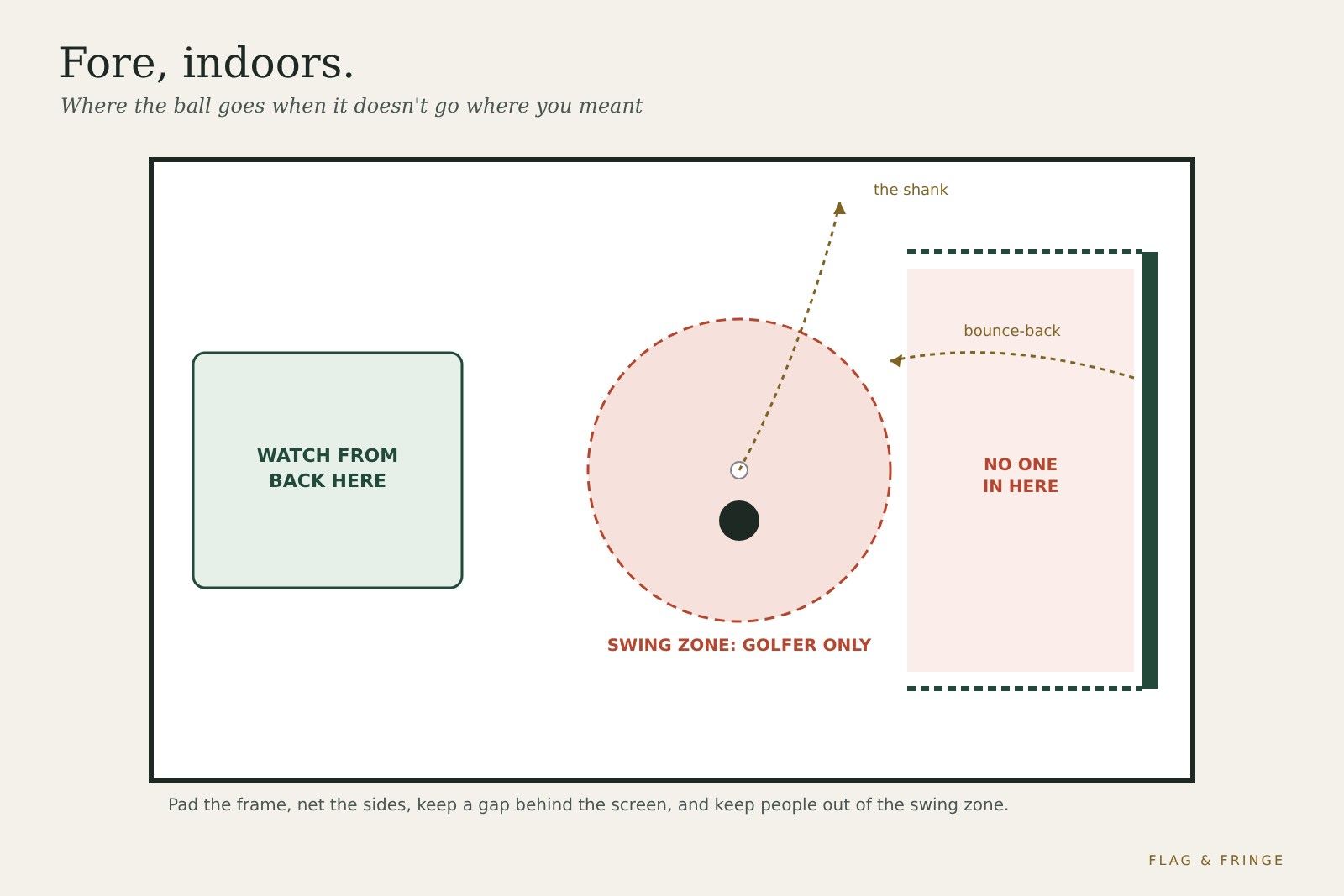
A golf simulator is a room where someone swings a metal club at a hard ball, a few feet from a wall. Most of the time the screen does its job. The rest of the time, a little planning keeps a bad shot from becoming a bad day. Here are the real risks, the fixes the makers recommend, and a few things that will happen to you eventually.
Why it's worth taking seriously
Golf injuries aren't rare. A US study of emergency room visits from 1990 to 2011 estimated about 663,000 people aged 7 and over were treated for golf-related injuries. Being hit by a club made up 23.4% and being struck by a ball 16.0%. The head and neck were the most commonly injured area, and children aged 7–17 had the highest injury rate. A review of golf-related eye injuries summarized by the American Academy of Ophthalmology found most were caused by golf balls.
Those numbers cover all golf, not just simulators; we didn't find injury data specific to home sims. But an indoor bay packs the same club and ball into a much smaller space, which is why the fixes below matter.
Danger 1: the bounce-back
A ball that hits a tight screen, a frame or a hard wall comes back at you. Carl's Place says wedge shots cause most bounce-back. The fixes:
- Leave a gap behind the screen. Carl's Place says 12–16 inches off the wall; SkyTrak says ideally about 2 ft. A screen pressed against drywall can't absorb the hit.
- Don't over-tighten. Shop Indoor Golf says a screen that's too tight can cause higher bounce-back, and suggests using fewer bungees at the bottom. Carl's Place says the screen should be flat but still able to move.
- Pad the frame. Garmin's R10 manual says to make sure any net or enclosure frame is padded to help reduce ball ricochet. Carl's Place sells foam inserts that cover the pipes behind the screen's flaps.
- Add something soft behind it. Shop Indoor Golf says a blanket or netting behind the screen can absorb extra impact energy.
- Mind the mat. Carl's Place notes a hard, cheap mat can add to bounce-back.
Danger 2: the shank, the top and the sky ball
Not every shot finds the screen. Plan for the ones that don't:
- Side nets or net walls. Carl's Place says net walls do a great job of catching errant shots.
- Ceiling baffles. Carl's Place says baffles protect people, walls and surroundings from balls that bounce back fast and high.
- Soft walls. Foam panels or padding on hard walls near the hitting area turn a ricochet into a thud. Cover windows, lights and anything glass within reach of a mishit.
- Protect the projector. BenQ says it should be protected from being hit by a club or ball. A ceiling mount above and behind the golfer keeps it out of play; a floor-mounted projector needs a protective enclosure, says Carl's Place.
Danger 3: the club itself
- Ceilings and lights. Test-swing your driver slowly on the hitting spot before you buy anything. If the club touches the ceiling, the room needs another plan. See our ceiling height guide.
- Practice swings. Take them on the hitting spot, where you measured the space, not a step to the side where the wall is closer.
- Grips and gloves. A club that slips out of sweaty hands goes somewhere you didn't plan. Keep grips clean and dry.
For the full space math, see minimum golf simulator size.
When there's more than one person in the room
Sim nights are the fun part, and the riskiest. Carl's Place says the safest spot is behind the hitting area and outside the golfer's swing zone, and that nobody should sit, stand, lean or wander between the golfer and the screen. House rules that work:
- One golfer in the swing zone. Mark it with tape on the floor. Everyone else waits outside it.
- Watch from behind. Put seating behind the hitting area, not beside the screen. Carl's Place warns that side seating has to stay out of likely shank and bounce-back zones.
- Nobody behind the screen. Carl's Place: don't let kids, pets or curious friends wander behind the impact screen while someone is hitting.
- Re-check when a lefty steps up. Carl's Place notes a spot that's safe for a right-hander may not be safe for a left-hander.
- Say it out loud. "Hitting!" before each swing costs nothing and stops someone walking in to grab a drink.
- Kids and pets. SimSpace's safety guide says to consider whether children or pets will have access to the room. A closed door during play is the simplest fix.
The room and the gear
- Cables and mat edges. SimSpace says organize cords to prevent tripping. Tape down or route cables away from where people walk.
- Clean balls only. Carl's Place says even a slightly scuffed ball can damage a screen, and to use balls free of dirt, grass or marker.
- Projector heat. BenQ's TK710 manual warns that blocking the vents can cause overheating and fire, and asks for at least 50 cm of clearance from walls. Check your own model's manual. It also says not to look straight into the lens.
- Power. SimSpace suggests plugging the electronics into a surge protector.
Things that will happen eventually (and the fix)
Every home sim owner collects a few stories. Ours, with the lesson attached:
- The ceiling autograph. The first full driver swing leaves a neat little mark overhead. Congratulations: you've measured your ceiling. Next time, use the slow test swing first.
- The boomerang wedge. A crisp wedge comes back faster than it left and lands at your feet like it's proud of itself. Loosen the bottom bungees and check the gap behind the screen.
- The dog who thinks it's fetch. Every ball is a gift, and the dog is very good at its job. The dog waits outside during play.
- The guest who wants a closer look. "I just want to see the ball leave the club." From the couch, please. That's what the slow-motion replay is for.
- The shank heard round the house. It finds the one thing you didn't pad. Now you know where the side net goes.
- The lefty plot twist. Your buddy is left-handed, and the bookshelf is suddenly in play. Mark both stances before the night starts.
- The scorecard argument. No safety risk here. Just pride. The simulator doesn't give mulligans, even indoors.
Golf simulator safety checklist
- Screen 12–24 in off the wall, not over-tightened.
- Frame and nearby hard surfaces padded.
- Side nets or barriers for shanks; baffles if high balls come back.
- Projector mounted above and behind the golfer, vents clear.
- Swing zone taped on the floor; one golfer inside it.
- Seating behind the hitting area, out of shank and bounce-back paths.
- Kids and pets out, or supervised, during play.
- Cables routed and taped; clean balls only.
FAQ
Can a golf ball bounce back off a simulator screen?
Yes. Wedge shots cause most of it, says Carl's Place. A gap behind the screen, correct tension and a padded frame reduce it.
How far should the screen be from the wall?
Carl's Place says 12–16 inches; SkyTrak says ideally about 2 ft.
Where should people stand while someone is hitting?
Behind the hitting area and outside the swing zone, says Carl's Place. Never between the golfer and the screen, and never behind the screen.
Is a golf simulator safe for kids?
With supervision and house rules. Children had the highest golf injury rate in the US study above, and an eye-injury review found children were more likely than adults to be hurt by a club. Keep them out of the swing zone and away from the screen during play.
Do I need eye protection?
We didn't find eye-protection guidance from the sim makers we checked. Distance and placement are the main protection: stay behind the golfer and out of the bounce-back path. Safety glasses are a personal choice, especially for anyone watching up close.